
At the door
Door stations for every entrance.
Keypad, single-button and console outdoor stations, each with its own datasheet, answering on the same interface as the rest of the building.
See the intercom stations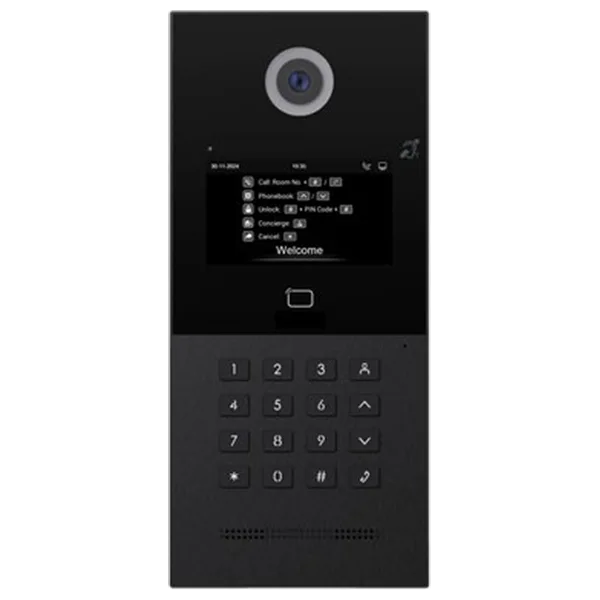

Solutions · Intercom
Solutions
A doorbell should not need its own handset on the wall next to everything else.
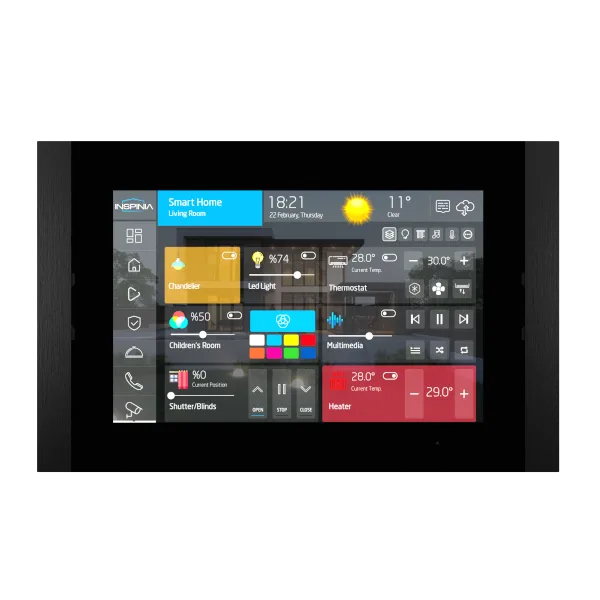
The call arrives on the panel that already runs the room.
See and hear who is at the door before anything opens.
Commissioned with the rest of the project instead of as a separate installation.
01In the room
Intercom, door control and cameras sit inside the interface people use for lighting and climate — not in a second app.
See the visualizationAt the door
Keypad, single-button and console outdoor stations, each with its own datasheet, answering on the same interface as the rest of the building.
See the intercom stationsHow it works
The intercom runs over VOIP and each unit configures its own IP address, so there is no SIP server to provision and no manual setup. Akuvox, Bticino and 2N are recognised as they are; other outdoor stations need little more. Calls and entry are answered on the panel or the app.
Intercom topology
Intercom, entry points and door control managed as one system.
The door on the panel in the hall or on the phone in a pocket, in real time.
Entry events sit next to light, climate and security on the same interface.
Intercom solutions
A call from the entrance rings the panel in the room, not a separate handset.
01
High-definition picture and two-way audio on the screen already on the wall.
02
Open from the same screen, in the same interface as light and climate.
03
Take the call in the SkyThings app when nobody is home.
04
Who may open what, held with the rest of the project.
05
Calls run inside the installation rather than through an outside service.
06
Capabilities
The call arrives on the panel already in the room.
Door and site cameras in the same view.
The door reaches a phone when nobody is at the panel.
Rules run on the device. Losing the cloud does not lose the room.
Projects, licences and monitoring in one place, per site.
One interface on the panel and in a browser. Built, not drawn twice.
The door count, the room count and the panel sizes. We reply with a specification.